AppLauncher for Small App

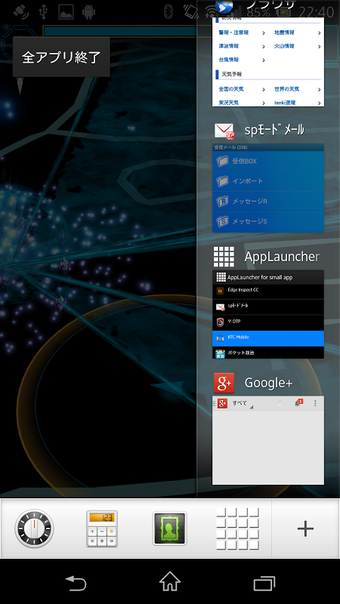
AppLauncher for Small App is a utility tool designed specifically for SmallApp users. It allows users to easily launch their desired apps within the SmallApp interface. When the app is launched, it displays a list of installed apps, and users can simply tap on the app they want to open in SmallApp mode.

One of the notable features of AppLauncher for Small App is the addition of the Shortcut (β) function. By tapping on the icon with a two-directional arrow, users are taken to a shortcut selection screen. From here, they can create shortcuts by pressing the "+" icon. Tapping on an item in the list will delete the shortcut. Similar to regular apps, users can also rearrange the order of the apps in the sorting screen.

It is worth noting that there may be some instability with certain features, which is why the Shortcut function is labeled as beta for the time being.

With the recent updates, AppLauncher for Small App has introduced grid display and the ability to rearrange apps by simply long-pressing on the item. This provides users with more flexibility and customization options.

Overall, AppLauncher for Small App is a convenient tool for SmallApp users who want quick access to their favorite apps within the SmallApp interface. It is compatible with Xperia Z, Xperia AX, Xperia Z1, Xperia Z2, Xperia Z3, Xperia Z4, and Xperia Z5.

 0/1

App specs

  • License

    Free

  • Version

    1.3.2

  • Latest update

  • Platform

    Android

  • OS

    Android 13.0

  • Downloads

    7

    Last month's downloads

    • 4
  • Size

    214.54 KB

  • Developer

    • おぎむまいり
  • Download Options

    APK, Google Play

  • Filename

    net-growegg-alfsa-15-8754328-7e6ad330bcb3e6fc748071c0b272c78b.apk

Program available in other languages


User reviews about AppLauncher for Small App

Have you tried AppLauncher for Small App? Be the first to leave your opinion!

Add review

You may also like

Explore Apps

Latest articles

Laws concerning the use of this software vary from country to country. We do not encourage or condone the use of this program if it is in violation of these laws.
Softonic

Is AppLauncher for Small App safe?

100/100

Score result: Clean

This file passed a comprehensive security scan using VirusTotal technology. It is safe to download.

  • Virus free
  • Spyware free
  • Malware free
  • Verified by Security Partners

    VirusTotal logo

Scan Info

Last scan
Tuesday, April 23, 2024
Scan provider
VirusTotal · Full report

File Integrity

File
net-growegg-alfsa-15-8754328-7e6ad330bcb3e6fc748071c0b272c78b.apk
SHA256
e85759e8ceca7a1d07743f68b978b586773ddaa90b85d8cea3c1dcece7bc2c0d
SHA1
85029697c7ba15d47cffdcfe8ac977244ac9475b

Softonic security commitment

AppLauncher for Small App has been thoroughly scanned by our advanced security systems and verified by industry-leading partners. This file comes from the official developer and has passed all our security checks, showing no signs of viruses, malware, or spyware. For more information, visit our Security and Trust Center